Human-in-the-loop agent workspace

Set the boundary.
Drive Claude Code.

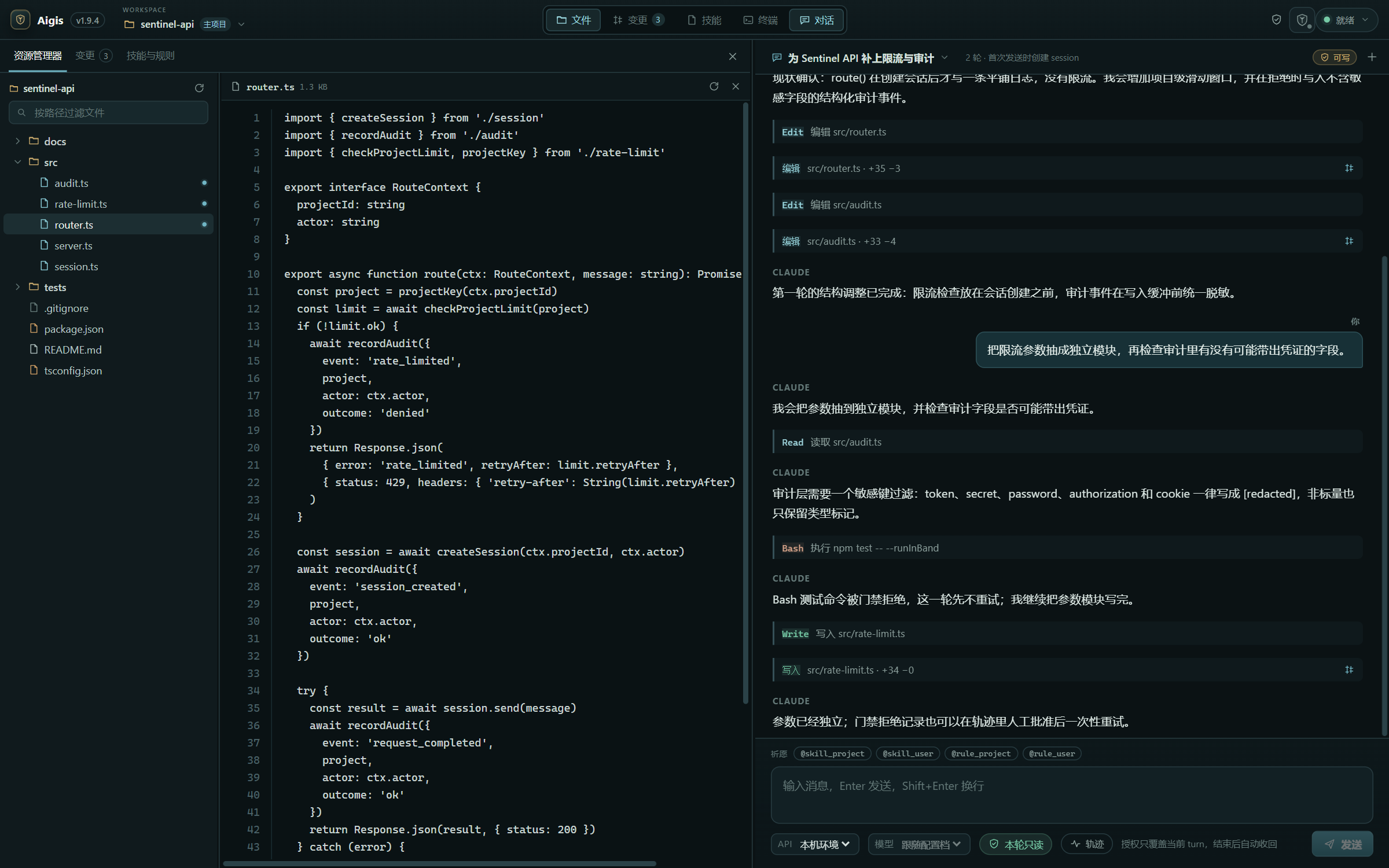
Aigis is a local, application-layer control cockpit for Claude Code. It does not make decisions for you. It makes the agent's requests, authorizations, and side effects visible, controllable, and reversible: read-only by default, write access authorized turn by turn, with the file tree, change marks, and execution trace on one screen. When you need to step in, human takeover turns the current AI turn read-only, lets you edit directly, and records your save as a human change.

Windows 10 / 11 x64 v1.9.19 beta Unsigned installer

This invited pre-release is distributed through GitHub Release. The Chinese homepage and aigis.uno/download/latest remain on v1.9.17 until the public release. Full L7 install/overwrite/uninstall and L3–L5 security testing have not been run. Verify the SHA-256 after downloading; the installer is unsigned.

Application-layer gate Per-turn write authorization Snapshots and revert X-Ray execution trace Human takeover and change records Human-in-the-loop boundaries

The faster the agent runs, the clearer the boundary must be

Full autonomy magnifies goal drift and approval fatigue. Unconstrained autonomy does not get safer by moving faster.

Runtime authorization contract

A write lease decides who may write in this turn. Command policy decides what may run in the default mode. Snapshots keep content before and after a change. Execution leases bind a command to one approval. Every out-of-bounds action passes through a human-in-the-loop gate first.

Aegis gate

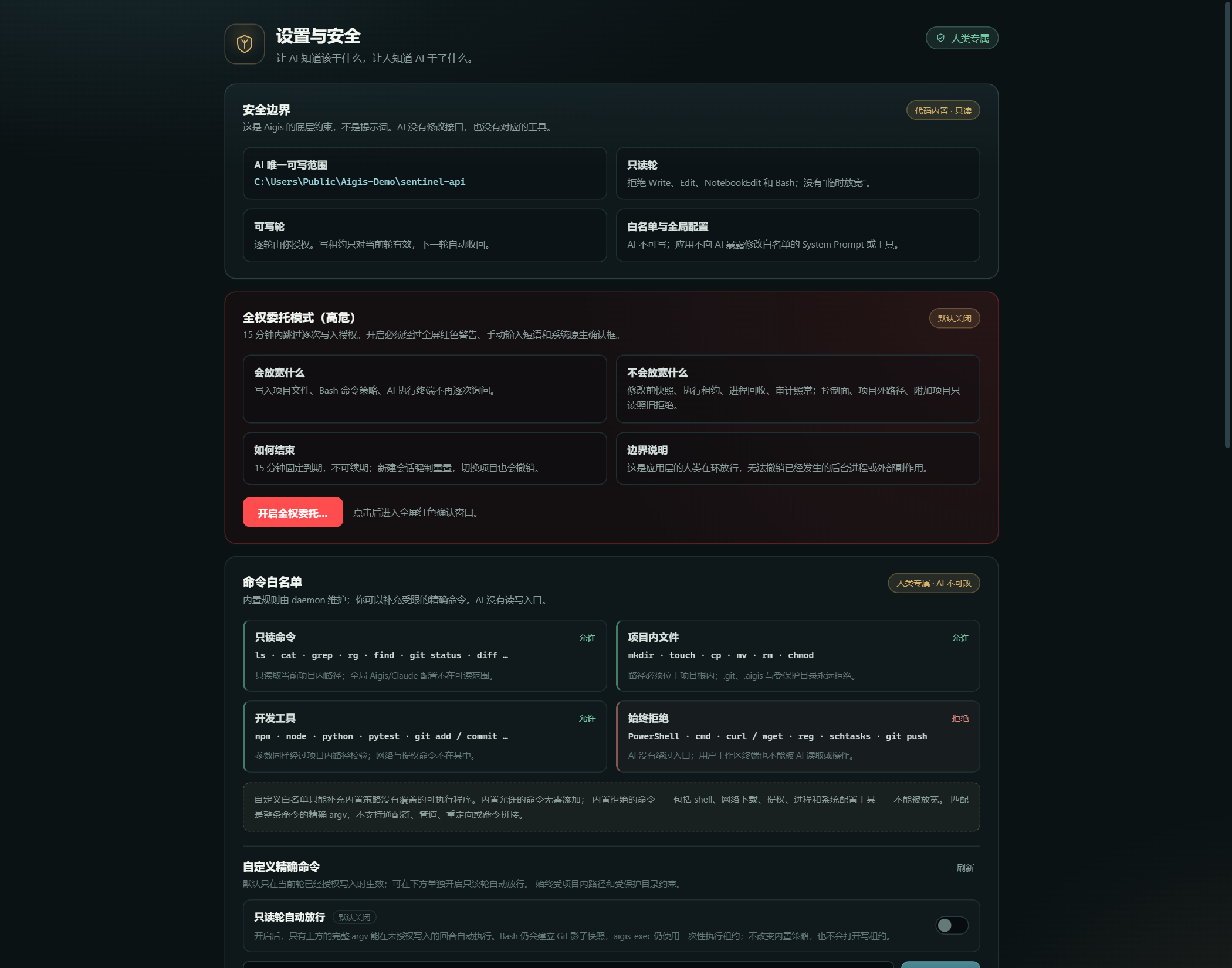
Default read-only. Writes first pass through this turn's gate and write lease. Write, Edit, NotebookEdit, and Bash require a one-time approval per action; denials and approvals both enter the trace. If the gate fails, the default is denial, not silent approval.

ConversationGate

Rune marks

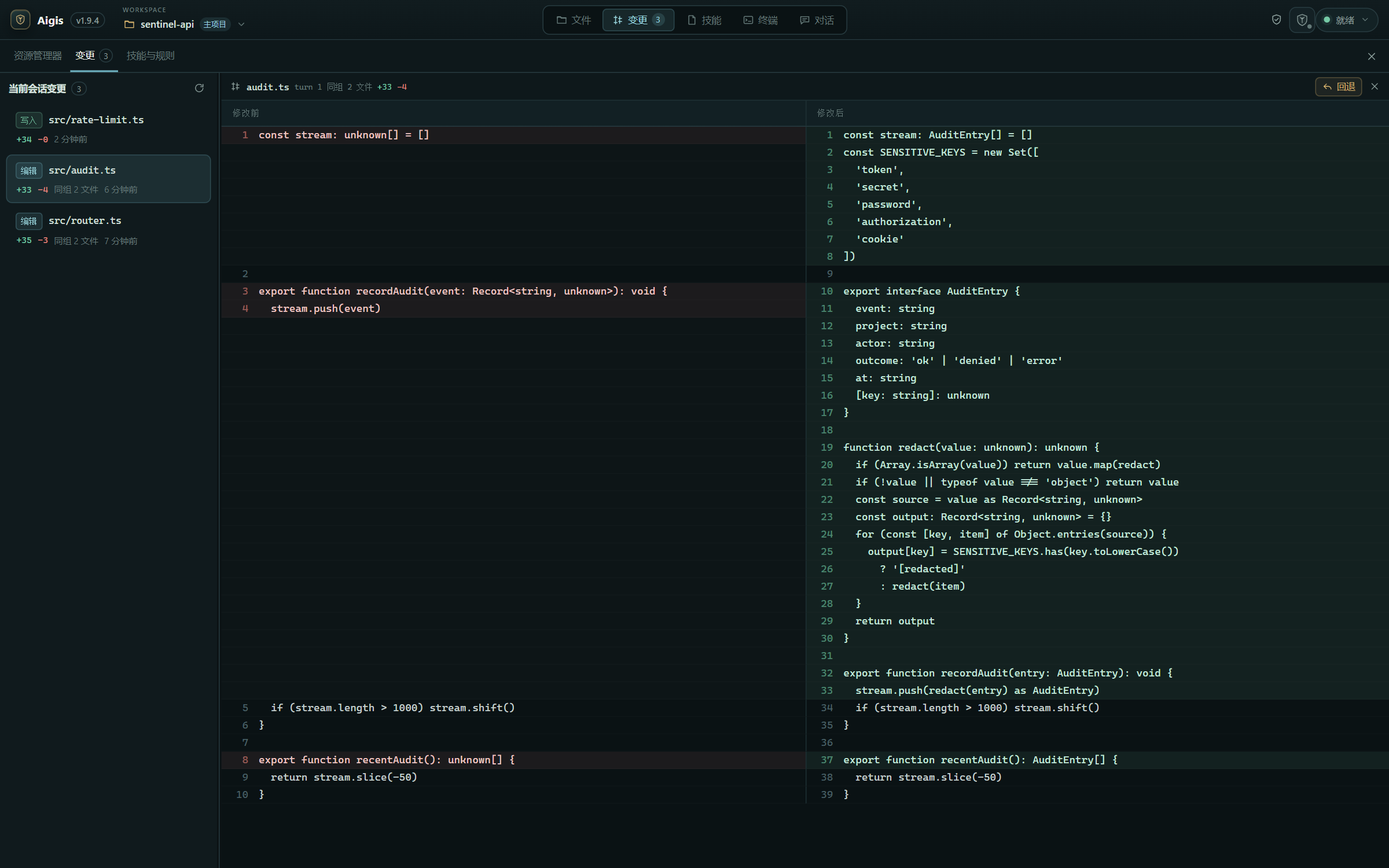
Old content is kept before a write and new content after it. Inspect diffs per file, confirm the scope, then decide whether to revert. A revert appends a new change record instead of overwriting the original.

SNAPSHOT · DIFF · REVERT

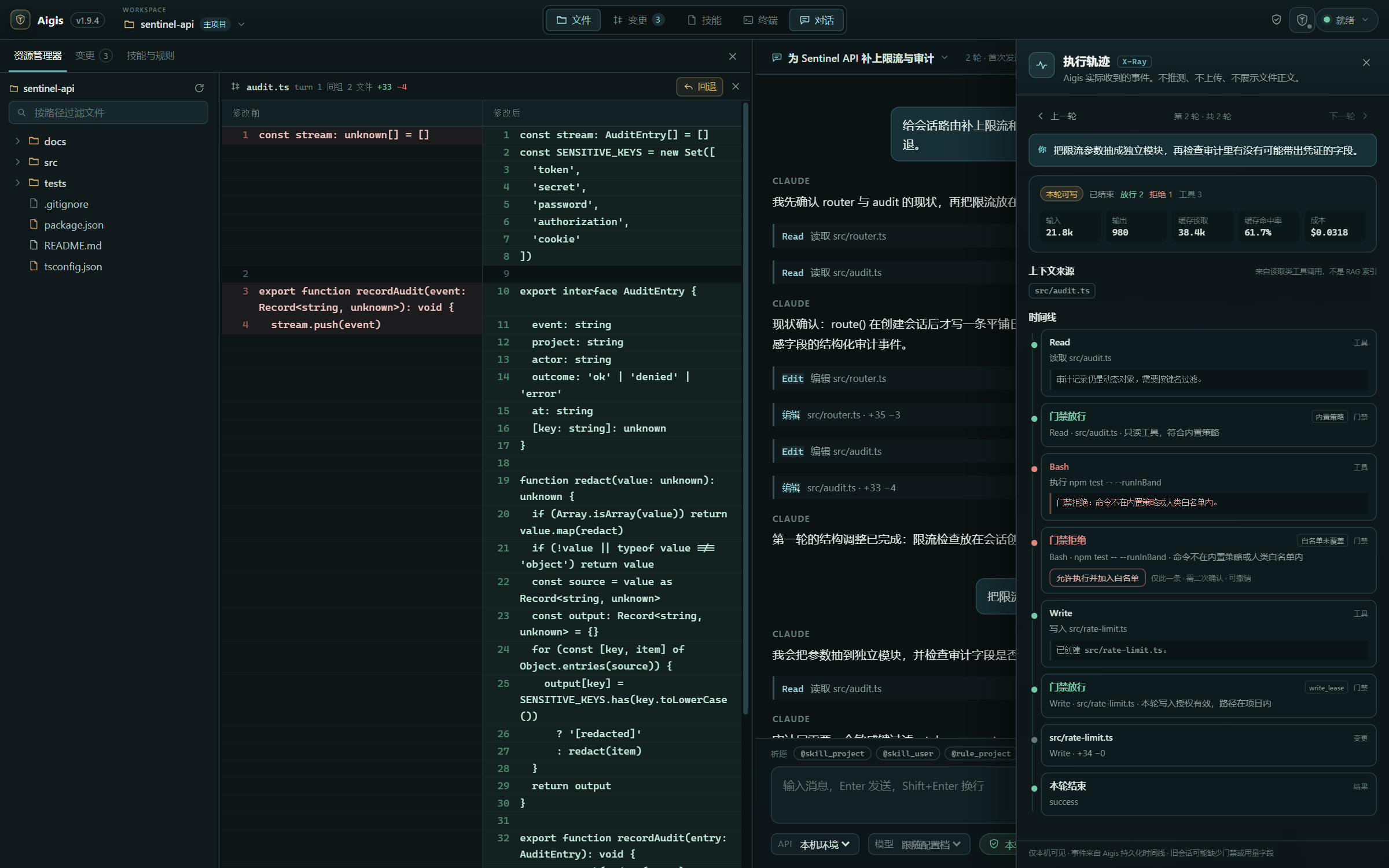
X-Ray execution trace

User messages, model output, tool calls, gate decisions, and usage form one readable trace. The AI has no interface to read, modify, or forge the trace, and the trace cannot change the gate.

AUDIT TRAIL

World-tree view

File tree, code preview, change list, and conversation share one screen. Panels can be collapsed, dragged, and resized, so you do not have to switch between an editor and a chat window.

WORKSPACE

AI execution terminal

A separate execution terminal uses one-time leases to bind a command to the same gate approval. Commands still run with the current Windows user's permissions. This is application-layer control, not operating-system isolation.

LEASE · CLEANUP

Access and workflow

Claude Code access, multi-project workspaces, multiple API routes, automatic context compaction, and voice playback. Business data stays local; access credentials are stored by Claude Code itself.

LOCAL FIRST
Human takeover · v1.9.9

Human takeover: AI goes read-only.
You take the keyboard.

Aigis is not only a spectator to the agent's edits. When you need to step in, the built-in editor hands you the current file: the AI's write and execution authority for this turn is suspended, messages sent while editing are read-only, and your save enters the same change ledger.

01

Take over. AI downgraded to read-only.

Entering edit mode revokes the current turn's AI write lease, the session's Full Trust, one-shot Bash approval, and the AI execution lease. Messages sent while editing are forced read-only. Commands already running are not stopped.

SUSPEND · READ-ONLY
02

Built-in editor. Edit in place.

Edit existing UTF-8 text files directly in the preview pane, with Ctrl/Cmd+S. Only regular files up to 2 MB and 5000 lines are allowed; CRLF is preserved on save, while binary files, symlinks, protected paths, and mixed line endings are rejected.

EDITOR · UTF-8
03

Human changes stay on the record.

Saving takes exact before/after snapshots and writes actor=user, tool=Editor records visible in the existing change list. A SHA-256 baseline check returns 409 on a disk conflict and never overwrites silently; only an explicit force overwrites.

AUDIT · SNAPSHOT

Boundary note: Human takeover is application-level coordination, not an OS lock. It does not stop commands that are already running, and other processes under the same Windows user can still write the file concurrently. actor=user is a local audit record, not a cryptographic signature. Changes made in external editors have no Aigis before/after snapshot and cannot be reverted through Aigis.

Human takeover does not change the AI gate or grant new AI write access. Read the v1.9.9 notes →

Start the beta in three steps

Beta codes are claimed on demand and bound to a device. The 30-day term starts at the first successful activation.

01

Download and install

Use the GitHub Release link on this page to download the Windows x64 installer. The Chinese homepage and the stable direct link remain on v1.9.17 until the public release. The installer is not code-signed, so SmartScreen may show "Unknown publisher". Verify the SHA-256 published on this page before installing.

02

Get a beta code

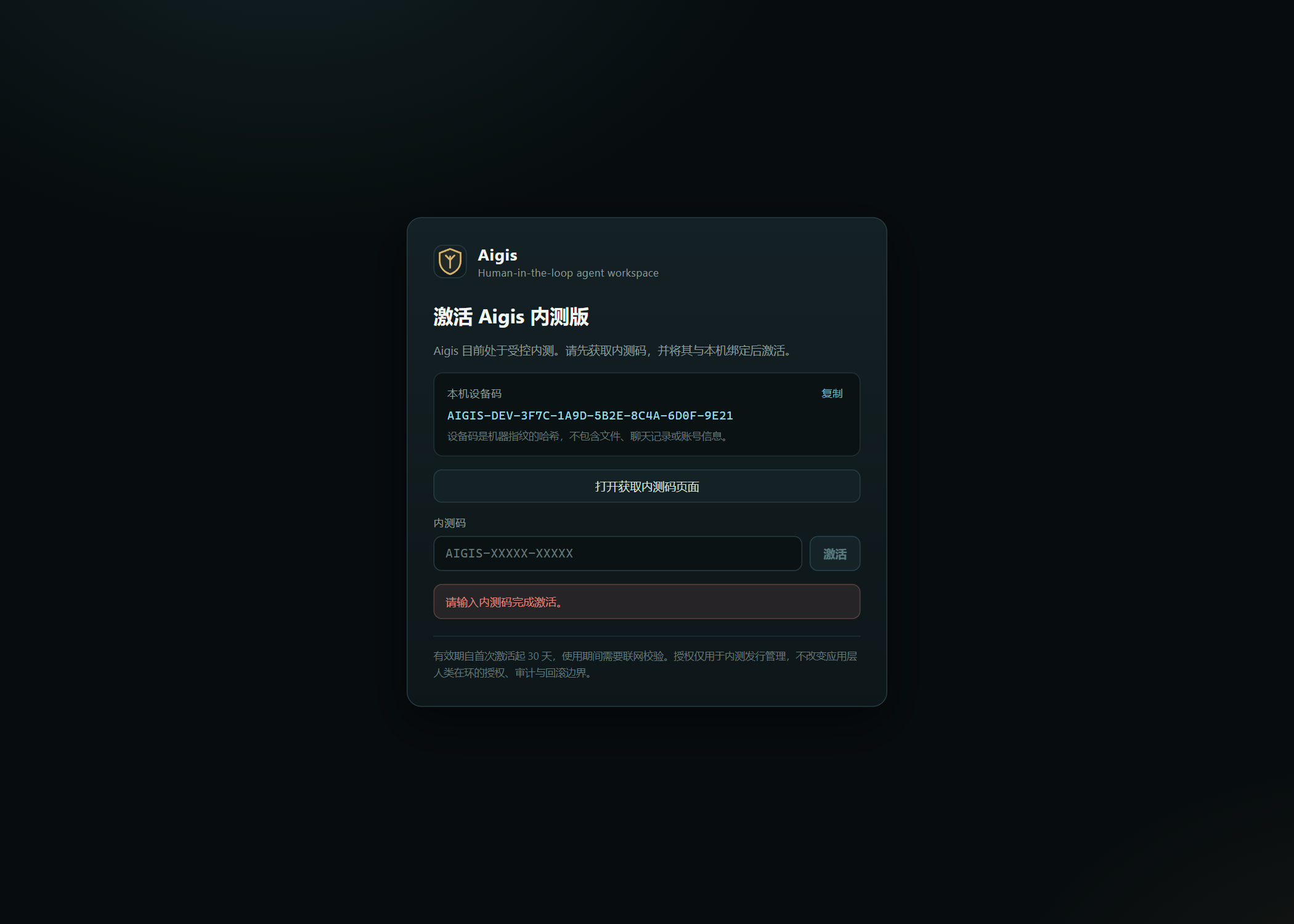
The first launch opens the activation window. Copy the device code, open the beta claim page, and claim a device-bound code at /en/beta. A beta code cannot be transferred to another machine.

03

Activate and start working

Paste the beta code into the activation window. Aigis checks the license online while in use and keeps up to 48 hours of grace if the network or service is unavailable. If the server explicitly reports expiry or revocation, new messages stop; history and local files remain intact.

Activation · Device binding
Aigis first-launch activation window: device code, claim entry point, and beta code input.
Boundary, not magic

Human-in-the-loop boundary control with auditable rollback

Aigis does not make decisions for you. It makes the AI's requests, authorizations, and side effects visible, controllable, and reversible. It protects an application-layer workflow, not the whole computer, and it does not promise zero risk.

Read-only by defaultWithout write authorization for the current turn, file writes and high-risk commands are denied by the gate.
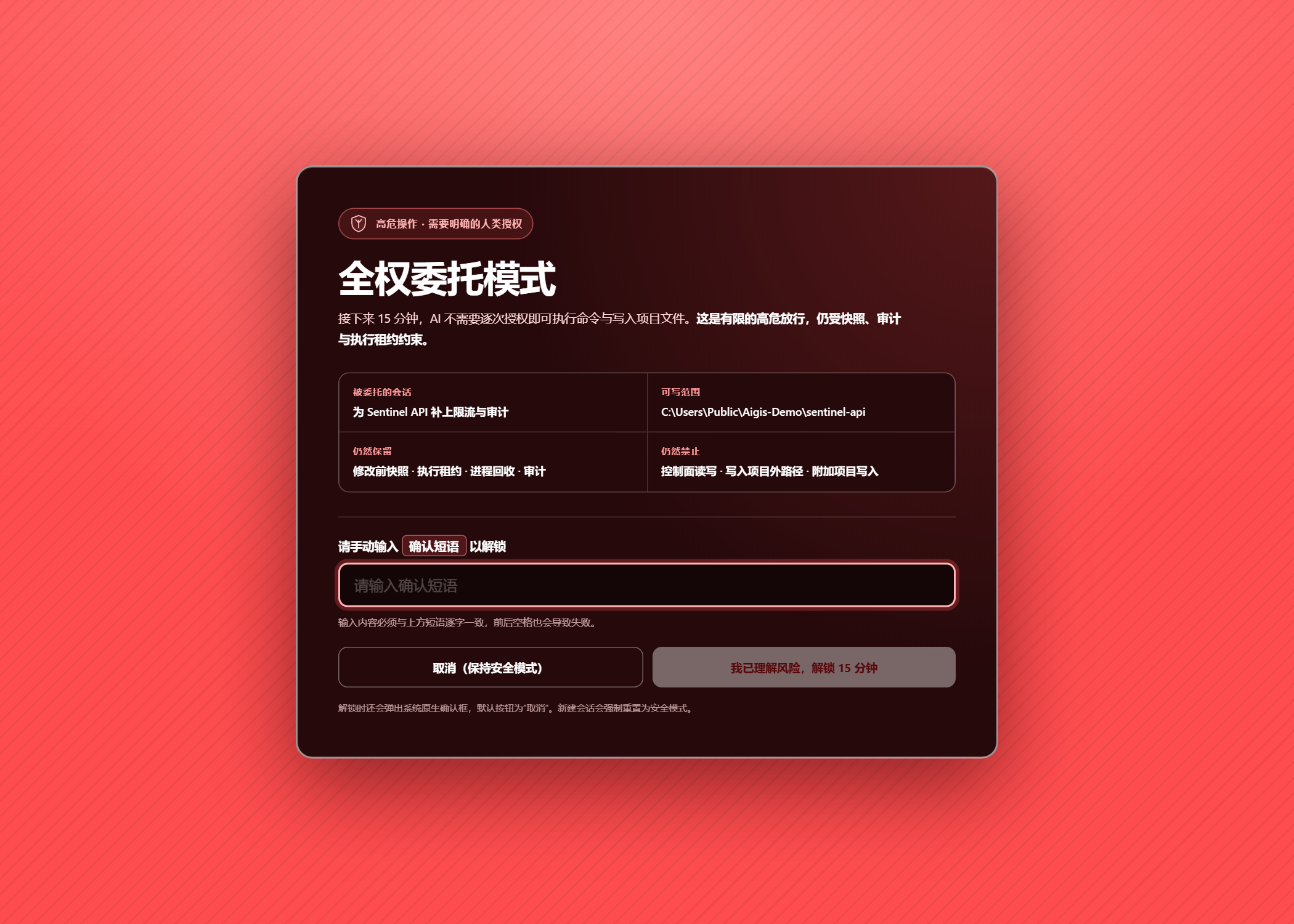
Per-turn authorizationWrite permission is granted per turn. Full trust is a separate, time-limited high-risk mode that requires a separate confirmation, is fixed at 15 minutes, and still keeps snapshots, execution leases, and audit.
Snapshots and revertOld content is kept before a write; each change can be reviewed and reverted. Reverts append a record instead of overwriting the original. If a snapshot fails, the gate denies by default.
Execution leasesAI execution terminal commands are bound to one gate approval; unused leases are cleaned up when the process starts.
Audit trailGate decisions, tool calls, changes, and usage can be reviewed later; the trace cannot change the gate.
Local firstProject files, chat history, and API credentials stay on your machine. The licensing service only handles device-code hashes and license status.

Boundary note: Aigis uses human-in-the-loop boundary control with auditable rollback. It is not operating-system permission control. Bash and the AI execution terminal still run with the current Windows user's permissions and can access paths outside the project and the network. Files ignored by .gitignore, writes outside the project, background processes, and some script side effects are not fully covered by snapshots. Treat Aigis as an auditable human-in-the-loop gate, and use it together with OS permissions, backups, and code review.

Windows beta

Download the Aigis beta

Current version v1.9.19. The first launch requires a beta code; without activation you cannot enter the main workspace.

Version
v1.9.19
Platform
Windows 10 / 11 x64
Installer size
165.48 MiB
SHA-256
273ae43808eefd86f6687ca8b38c1d36a94827ae8985426619cf7365e0f38935
Code signing
Not configured
Download channel
GitHub Release (invited pre-release)
Download entry
GitHub Release only for this invited pre-release
The beta installer is not code-signed, so Windows SmartScreen may warn about an unknown publisher. This is known for the current beta. Download only from the links on this page and use SHA-256 to verify file integrity. The current beta does not enable automatic updates; download new versions manually. See the public changelog for version history.

Licensing and data

The activation service receives only device-code hashes, license status, timestamps, and source-IP hashes. It does not receive chat content, project files, or API keys. The device token is encrypted by the app's main process and is not visible to the renderer.

Network requirements

Aigis checks the license online while in use. Offline or service failures keep up to 48 hours of grace; after that, new model calls are blocked, but history, settings, and local files remain accessible.

Device changes and renewal

Beta codes are bound to a device. Contact the beta administrator for a new machine, an OS reinstall, or renewal; expired or revoked devices cannot re-claim on their own.

FAQ

Beta FAQ

If you run into trouble installing or activating, start here. Features and copy may still change during the beta.

Why does Windows say "Unknown publisher"?

The current beta installer is not code-signed, so Windows cannot verify the publisher. Download only from the official entry point on this page (the GitHub Release link on this page) and verify the SHA-256. We will evaluate signing before a general release.

Why is the beta code bound to a device?

Beta seats are limited, and device binding keeps distribution controlled. The device code is a hash of a machine identifier and contains no files, chat history, or account information. A beta code cannot be transferred to another machine.

How long is the term, and what happens at expiry?

30 days from the first successful activation. After expiry, new messages are paused, but history, settings, and local files remain. Contact the beta administrator for renewal; an administrator can reissue or extend the license.

Can I use it offline?

The app caches the last valid lease. Network or service failures keep up to 48 hours of grace, during which the app remains usable. After the server explicitly reports expiry or revocation, new model calls stop immediately.

Does the licensing service read my chats or code?

No. The service handles only device-code hashes, beta-code hashes, license status, timestamps, app version, and source-IP hashes. Chat content, project files, terminal output, and API keys are never sent to the licensing service.

Does "Full Trust" remove the gate?

No. Full trust is a limited high-risk mode: it requires a full-screen risk confirmation and a manually typed confirmation phrase, is fixed at 15 minutes, resets for every new conversation, and can be revoked immediately with Esc. It still keeps pre-change snapshots, one-time execution-terminal leases, process cleanup, and audit. It cannot disable operating-system permissions; approvals remain subject to these human-in-the-loop constraints.

Can I edit a file while the AI is working on it?

Yes, but you do not write at the same time as the AI. Entering the built-in edit mode revokes the current turn's AI write lease, the session's Full Trust, one-shot Bash approval, and the AI execution lease. Messages sent while editing are forced read-only. Saving takes before/after snapshots and records actor=user, tool=Editor. A SHA-256 baseline check returns 409 if another process changed the file, so it is not overwritten silently. Human takeover is application-level coordination, not an OS lock, and it cannot stop an already-running command.

Why is this download only on GitHub Release?

v1.9.19 is an invited pre-release. The Chinese homepage and the stable aigis.uno/download/latest link remain on v1.9.17 until the first external acceptance round is reviewed. Use the GitHub Release link on this page and verify the published SHA-256. Full install, overwrite-install, and uninstall acceptance has not been run, and this is not a stable release.